The Atomic Design Method
Published on
Atomic design is a methodology for creating robust design systems through a hierarchical component structure. After discovering the concept in the course that inspired my blog, I decided to dive deeper by reading Brad Frost’s Atomic Design. After finishing the book I was eager to apply the concept to the codebase for my blog so that I have a consistent hierarchical folder structure.
The basic building blocks of the methodology are heavily inspired by chemistry as you'll see in the five categories outlined below.
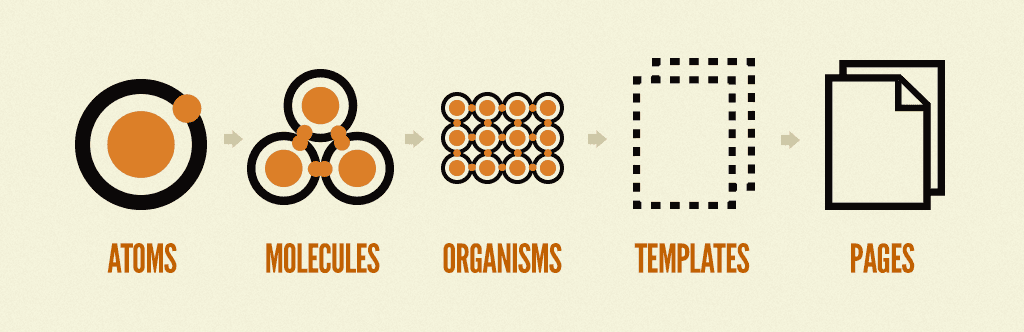
| Category | Description |
|---|---|
| Atoms | These are the smallest, indivisible UI elements such as buttons, inputs, or icons. |
| Molecules | Atoms that are combined to form simple functional units (e.g., a search form that includes an input field and button). |
| Organisms | An aggregation of atoms and molecules to create more complex structures like headers or footers. |
| Templates | These provide page-level layouts, providing the structural framework for content. |
| Pages | Instances of templates, populated with actual data to form the final UI. |
While the book emphasizes applying this hierarchy to a pattern library of UI elements (thus setting aside complex functionality), I believe that its principles are versatile enough to enhance other front-end systems as well. I figured what better way to practice what I had just learnt than to organise my blogs codebase with this methodology. I'm using Next.js so the layout.js files pretty much cover templates and page.js alike to pages. This leaves me to start organising my components into atoms, molecules and organisms.
Atoms were the easiest of the three because I'm just identifying components that use one html element, of which I found three. A logo, toggle and visually hidden span element to help screen readers. To get an idea of an Atom, heres a snippet of the Logo components markup.
Initially I had some trouble confidently categorising a component that was either a molecule or organism. But by coming back to the molecule description I realised that these only include a simple set of html elements and/or some of my atoms. Heres a snippet of the BlogHero molecules markup.
That left the rest to the organisms category, below is what my components directory now looks like.
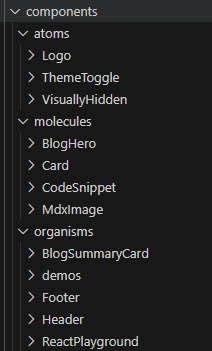
This feels much more organised than a dump of the components and should help with navigating the codebase as it grows. I do appreciate how straightforward this method is and believe I can only get better at categorising a component with it. On much larger codebases I see this improving the code maintainability and scalability once you get the developers onboard with the method. The book even mentions empowering the designers to work on the html and css markup of their designs if you have a friendly pattern library for them to work with!
By breaking down complex interfaces into small, reusable components, you create a system where every "atom" plays a vital role in forming the cohesive "molecules" and "organisms" that bring your digital product to life. I hope you're now feeling inspired to apply this practical method—whether it’s for a personal project or within your team at work.