GIFs' Effect on Largest Contentful Paint
Published on
Largest Contentful Paint(LCP) is one of the three Core Web Vitals metrics which contributes to search success and great user experiences. LCP reports the render time of the largest image, text block or video visible in the viewport relative to when the user first navigates to the page. In my last blog covering VS Code shortcuts, I learned alot about how GIFs affect the LCP metric.
Initially, I rendered all the GIFs in the post without considering their impact on performance. However, as I neared completion of the content, I quickly learned - after generating a Lighthouse report - that my approach was inefficient. All eight GIFs were being downloaded on the routes initial page load, which quickly added up.
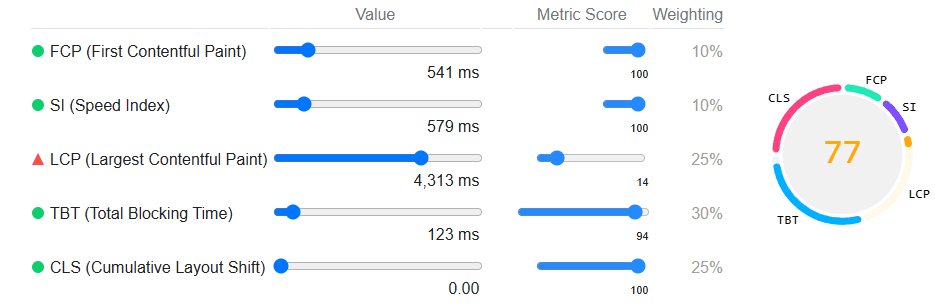
I want readers to have a delightful experience on my blog and poor performance doesn't contribute positively to that goal 😅.
I soon realised that I had a priority property as a default on my image component, causing all images to download on the initial page load.
Removing it allowed my GIFs to lazy-load resulting in a 68% performance improvement!
Image elements come with a loading property
that can be set to lazy, ensuring the image loads only when it comes within a certain range of the visible viewport(1250px for fast connections, otherwise 2500px).
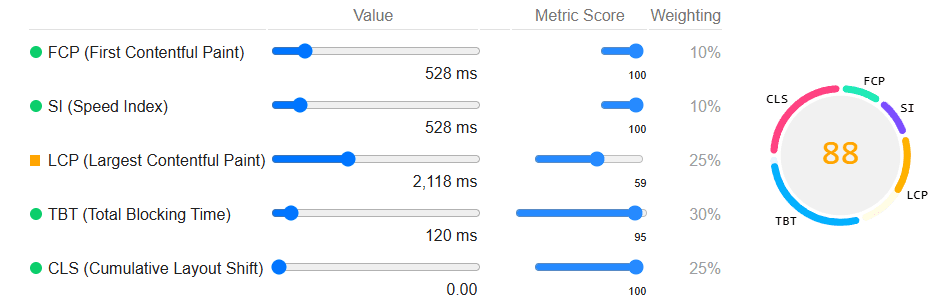
I was pretty happy with this performance improvement but I noticed the Lighthouse report suggested replacing animated GIFs with video for faster page loads.
After reading the suggestion I begun converting my GIFs to MP4s and then creating a video component. To replicate a GIF with the video element I need to reproduce its key traits.
The 3 key traits of a GIF are automatic play, looping continuously and being silent which can be replicated with the autoplay, loop and muted properties of the video element.
Below is a simple version of what I came up with after following the article:
Although video elements are usually LCP candidates, they are no longer considered for LCP when a poster image is not provided. Since we don't provide a poster image when emulating a GIF(as it would go unused), the next largest element becomes the LCP candidate instead. With these changes, I generated another Lighthouse report and saw a 110% performance improvement compared to the previous optimisation. That means, compared to my initial setup, I achieved a total performance improvement of 150%!
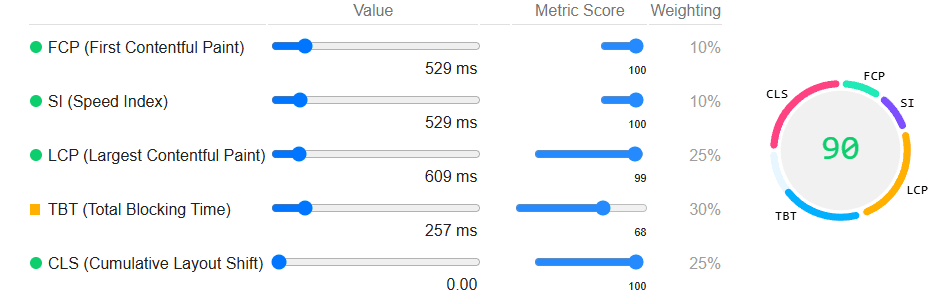
Since GIF files are typically larger and slower to download than video files, switching to <video> improves user experience, regardless of initial page load.
Based on the results, Lighthouse's recommendation to replace GIFs with videos is sound.