Adopting Agentic Workflows with Claude Skills
Published on
At the end of March, I did the Claude Code for Real Engineers course from AIhero educator Matt Pocock that has completely changed the way I develop software. In this post I'm going to cover an agentic workflow I've adopted for feature development based on the course learning material.
This workflow allowed me to solve a real problem I've had for years as a tennis fan when it comes to finding tournament information across the different tours.
First off, if you're not already familiar with Claude Skills, they are a feature that extends Claude's capabilities with SKILL.md files that include instructions. It's also valuable that you're familiar with the LLMs smart zone and dumb zone before jumping into an agentic workflow. You will want to aim to stay within the smart zone in every step of the workflow to get decent results.
| Zone | Position | Behaviour |
|---|---|---|
Smart Zone | First 40% of context | Sharp, capable, makes good decisions |
Dumb Zone | Last 60% of context | Confused, mistakes, degraded performance |
Claude Code doesn't show a status line with the amount of tokens and percentage used of the context by default. The ccstatusline is a nice community tool that formats this into a clean status line so you have visibility when you're nearing the dumb zone.
Grill Me
When I have a feature in mind, I start with the "grill me" skill. Its job is to ask as many questions as possible one at a time (following the design tree concept from The Design of Design) to reach a shared understanding with the LLM. For example,
Skill FileWrite a PRD(Product Requirements Document)
Staying in context with the grill me session, I'll invoke the "write a prd" skill.
This skill will verify its understanding of the feature against the current state of the codebase and ask any clarifying questions that it hasn't already gathered from the grill me session. It will then sketch out the modules(encouraging the LLM to follow the deep module concept from A Philosophy of Software Design) that need to be built or modified and check with you before submitting the PRD as a Github issue(using the Github CLI). The PRD will follow a templated structure with the problem statement, solution, user stories, implementation decisions, things that are out of scope and any further notes.
I'm using Github issues in this and the following steps within the workflow, but you could modify the skill to use your chosen issue tracking software's MCP tool instead. This would most likely be the way to go with cross functional software teams who are using tools such as Jira or Linear for issue tracking.
PRD to Issues
At this point in the process we can break the prd down into issues to begin working on. That's where the prd to issues skills comes in, simply calling the skill with the PRDs Github issue number will trigger it to start breaking down the work using the tracer bullet(also known as vertical slices) concept from The Pragmatic Programmer.
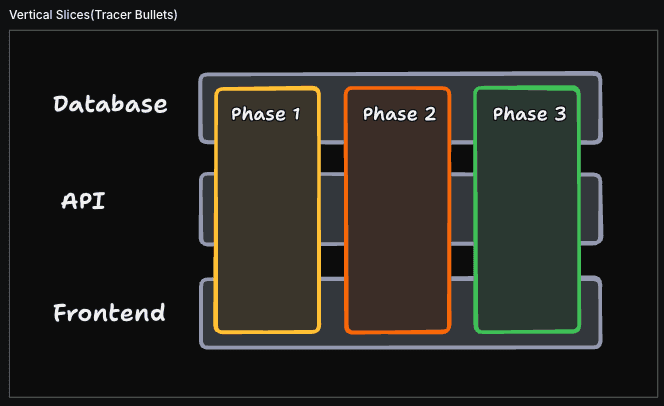
It then drafts a breakdown of issues with blocking relationships and the user stories covered from the original PRD before committing to creating the sub issues in your Github repository. It may not always get the breakdown right the first time(since LLMs are non-deterministic), in my experience with Sonnet 4.6 I sometimes have to re-prompt with "where is the tracer bullet?" before getting a result I'm happy with.
Skill FileDo Work
At this point you have everything ready to do the work, but we will let Claude trigger this skill automatically through a simple bash script. It will get the list of issues from Github and parse Claude the last 5 commits in the repo along with a prompt to instruct it to work on the "AFK (away from keyboard)" tasks in a prioritized order.
Once it has explored the repo it will automatically call the do-work skill that encourages it to implement the work using the red-green-refactor approach from Extreme Programming Explained.
In my experience, Sonnet 4.6 doesn't seem to follow the 1 test at a time guidance very well that is given for red-green-refactor in this skill. But it does start with the tests at least.
I'll be honest here, when I was using this to build Tennis Season (The app I built to solve the problem I mentioned earlier), I wasn't ever really "AFK". I like to follow Claude making small changes at a time to manage my own cognitive bandwidth and steer it when I see opportunities for improvement. For instance, I have multiple views on the tournament page - scores, draw, players and schedule. They all share a similar pattern that has loading, error and success states while fetching from a different API. I saw this as an opportunity to pause the session and steer towards a refactor to a reusable React hook while Claude still did most the grunt work of the feature/s.
Skill FileThe course ran over 2 weeks and I ended up taking this workflow and a couple of other skills it taught such as the improve-codebase-architecture skill and the sandboxed AFK Ralph loop to build an application that's improved my experience following the tennis season. Below is an image of the complete schedule feature that was part of the grill me example at the start of this post.
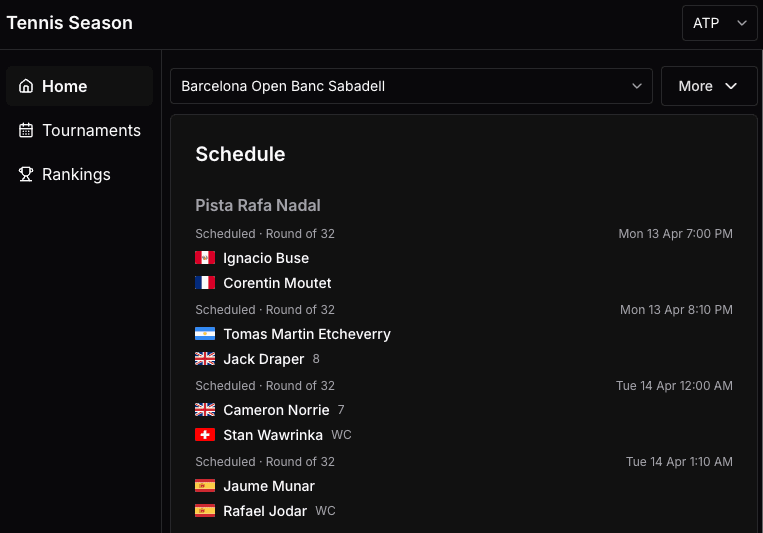
I think it's worth highlighting that this isn't vibe coding, this is taking real software engineering and design concepts from books that have been around for a long time and creating a complete agentic flow for software development. A year ago, like many other engineers I was concerned about AI tooling causing skills erosion but an agentic workflow like this has actually made me commit to studying some of the books mentioned throughout this post to improve my knowledge of software development. Who knows, there might be more gems in these books that can be turned into valuable Claude skills.